Clair on your Wear OS watch
Clair's watch app puts Claude Code's prompts on your wrist and keeps your sessions a glance away. It works together with Clair on your phone, which stays in touch with your computers and passes each prompt on to the watch.
What you need
- A watch running Wear OS 4 or later, paired with your Android phone.
- Clair on both. The watch app is a companion: prompts reach it through Clair on your phone, so the phone needs to be paired with your computer first.
Permission prompts
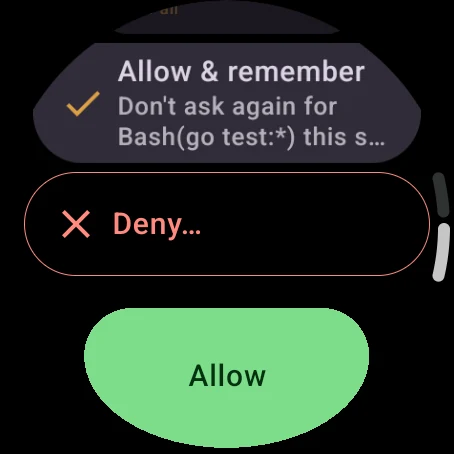
A permission prompt names the tool and shows exactly what it wants to do, such as the command it would run or the file it would edit. Then pick an answer:
- Allow lets it run this once.
- Allow for session lets it run for the rest of the session.
- Allow & remember accepts the rule Claude Code suggests, like every
go testrun, so it stops asking. - Deny asks why. Dictate or type a reason and Claude reads it, or send the denial without one.

Questions
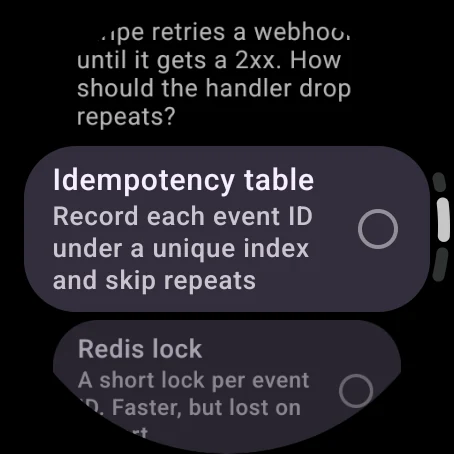
When Claude asks you to choose, each option arrives with its description. Scroll with the crown and pick one, or several when Claude allows it. Other lets you type or dictate an answer of your own. A question with several parts goes one step at a time.
Plan reviews
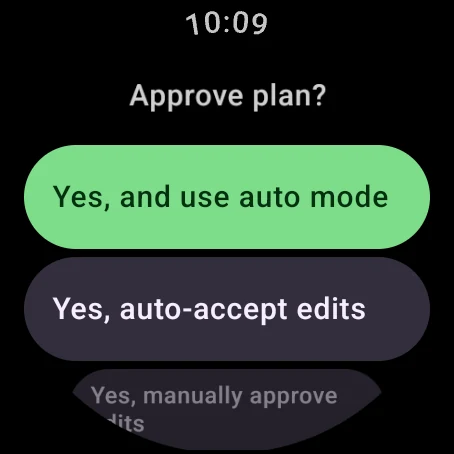
Read the plan on the watch, then answer with the choices the terminal gives you:
- Yes, and use auto mode
- Yes, auto-accept edits
- Yes, manually approve edits
- No, keep planning, with a note on what should change
The tile
Add the Clair tile and a swipe from the watch face shows what needs you. It changes with what's going on:
- One prompt waiting: that prompt, a tap from answering it.
- Several waiting: a row for each. Answer one and the next one opens.
- Claude working: what it's doing now, such as Reading, Editing or Testing, over a strip of its latest tool calls.
- Turn finished: how it went, such as Tests passed · 4 files, Build failed or Committed.
- More than one session running: a row for each session.
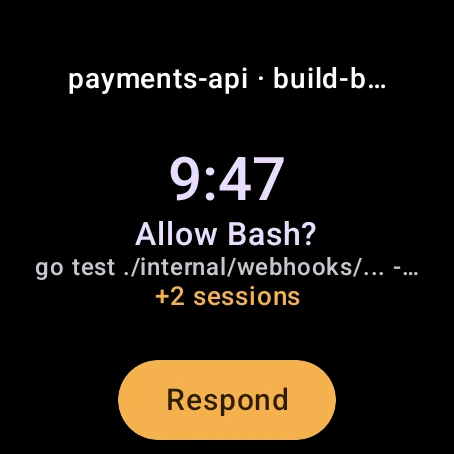
Tile detail, in the watch's settings, sets how much the tile and complication say. Detailed shows commands, files and questions. Normal shows projects and activity without the arguments. Private shows counts and states only.
The complication
Put Clair on a watch face and it counts the sessions waiting for you. With nothing waiting, it shows how many sessions are working, idle or ended instead, and Off when the watch can't reach your phone. Its ring is your token usage in the current five-hour window. Faces with room for the long version also show the seven-day window.
Away from your phone
Leave the phone at home and take the watch for a run. If the watch has its own Wi-Fi or LTE connection, prompts keep reaching it over the internet once the phone is out of Bluetooth range, and your answers go back the same way. The phone still does the work from wherever you left it, so it has to stay on and online.
The Phone card in the watch's settings says which it is: Connected nearby, Connected over the internet, or Disconnected. Disconnected means the watch can't reach the phone at all.
Between the phone and the watch, prompts travel over Wear OS's own connection, which runs through Google's servers when the two aren't within Bluetooth range. Clair's end-to-end encryption covers the path from your computer to your phone.
Watch settings
| Setting | What it does |
|---|---|
| Notify: permissions, questions, plans | Turns notifications on or off for each kind of prompt. |
| Vibrate on new request | Buzzes when a prompt arrives. |
| Tile detail | How much the tile and complication say: Detailed, Normal or Private. |
| Send crash & usage data | Sends crash reports and usage statistics to Google Firebase. Turn it off to stop both. The phone has its own switch. |
| Subscription | Whether the watch can answer prompts. You subscribe on the phone. Without a subscription, the watch still shows sessions, the tile, the complication and notifications, and prompts wait for you in the terminal. |
| Phone | Whether the watch can reach your phone, nearby or over the internet. |