Clair on your Android phone
Clair on your phone is the part that talks to your computers. Every prompt reaches it first. It decides whether to alert you, and passes the prompt on to your watch if you have one. It works without a watch too, and then the phone is where you answer.
What you need
- An Android phone running Android 12 or later.
- Notifications allowed for Clair. Without them, Clair can show prompts only while the app is open.
- A watch is optional. Add one running Wear OS 4 or later and prompts reach your wrist too.
Answer from the notification
Each prompt arrives as a notification you can answer without opening the app:
- Permission prompts: Allow, Allow for session, or Deny with a note telling Claude what to do instead.
- Questions: a question with one answer to pick shows its first two options as buttons, plus Other for a reply of your own. Any other question shows Answer, which opens it in the app.
- Plan reviews: Use auto mode, Auto-accept edits, or Keep planning with a note on what should change.

Tap the notification to open the whole prompt in Clair: the full command or edit, every option with its description, or the entire plan, where you can also choose to approve each edit yourself. A permission prompt there lists the rules Claude Code suggests, so you can tick "Don't ask again" for the session or for the project before you allow it.

When the phone speaks up
"Notify on this phone", in Settings, has three choices:
| Choice | What happens |
|---|---|
| Always | Every prompt alerts you on the watch and on the phone. |
| Only when no watch is reachable | The default. The phone steps in only while no watch running Clair is reachable. |
| Never | The phone stays silent. Prompts wait in the app and on the watch. |
Prompts the phone doesn't alert you for still get one silent "Waiting requests" line in the notification shade. Leave that channel on: it keeps Android delivering prompts on time, and without it they can reach the watch late.
When you're at the keyboard
The Clair agent notices when you're using a terminal on your computer. While you are, prompts reach your phone and watch quietly, since the terminal is showing them too, and a background agent's prompt goes straight to the terminal instead of waiting for your wrist.
"Present at the terminal within", in Settings, sets what counts as there: typing in a terminal within the last 120 seconds unless you change it, and 0 turns the whole thing off. On macOS and Linux only terminal typing counts, so reading in a browser counts as away. On Windows any input counts.
Your computers and sessions
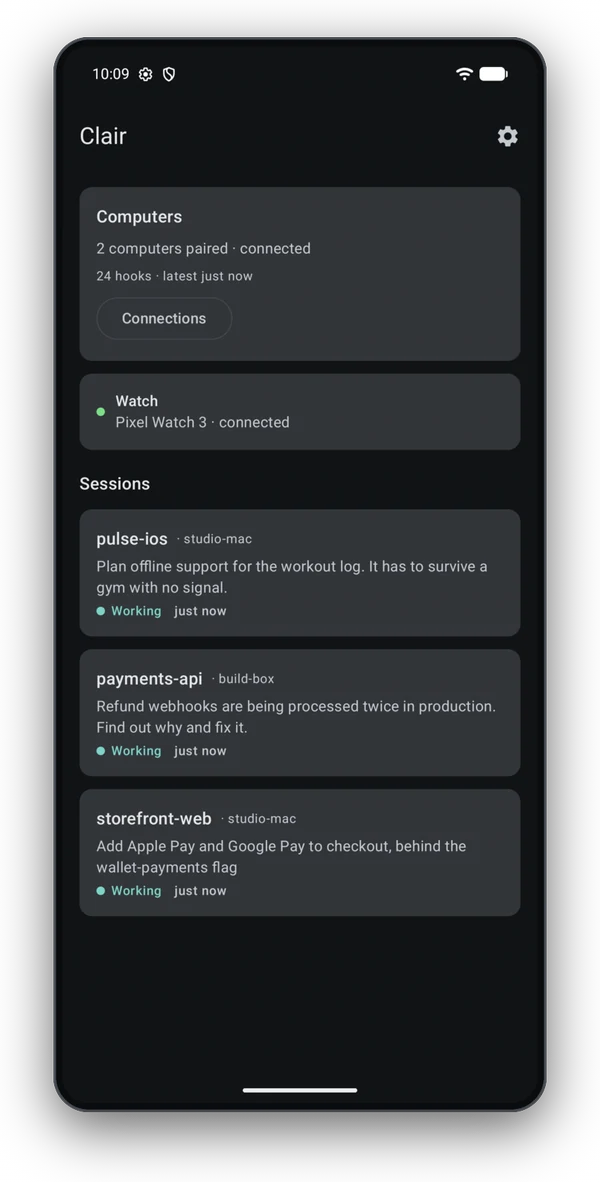
Connections lists every computer paired with the phone and whether each is connected, idle, offline or on standby. Pair another with Scan code, or with Enter link if you ran clair pair -qr none.
Revoke ends a pairing from the phone's side. It does the same as clair unpair on the computer, and anything still waiting on the relay is deleted with it.
Sessions from every computer show up together on Home, each labeled with its computer's name. Open one to see your last prompt, what Claude said, each tool call, and any agents or commands still running in the background.
Answering and read-only mode
Installing Clair is free, and so is following along: sessions, the tile, the complication and notifications all work without a subscription. Answering from the phone or watch takes a Google Play subscription, which Clair offers once your first computer is paired, with a free trial if Google Play has one for you. You manage or cancel it in Google Play.
Without a subscription, a prompt on the phone says "Answer this one in the terminal" and waits for you there.
Other settings
| Setting | What it does |
|---|---|
| Send Claude's questions to your watch | Questions show in the terminal and on your watch at the same time, and the first answer wins. |
| Prompt hook timeout | How long Clair's hook waits for your answer. A day unless you change it. |
| Include SessionStart hook | Shows a new session as Starting as soon as it opens. On unless you turn it off. |
| Stay connected to Clair | Keeps the phone connected to Clair's relay, and through it to your computers. They stay paired while it's off. |
| Reconnect after a reboot | Connects again on its own when the phone restarts. |
| Send crash reports and usage data | Sends crash reports and usage statistics to Google Firebase, to help fix problems in Clair. The watch has its own switch. |
Paired computers pick up changes to the hook and presence settings on their own.